The instructions below refer to PhpStorm, but all the steps for WebStorm are quite the same.
To take the logs you need to:
1. Open Help | Configure Debug Log Settings
2. Add the following lines:
- problems with PHP debugging: com.jetbrains.php.debug
- problems with deployment/synchronization: com.jetbrains.plugins.webDeployment
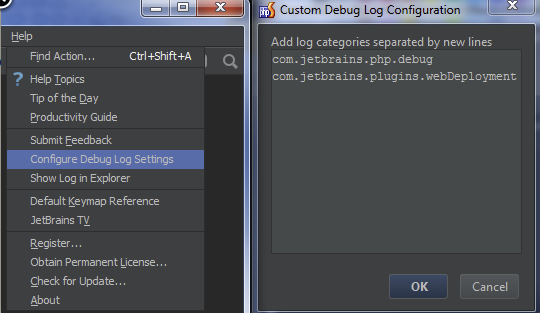
3. Click OK
4. Reproduce the problem.
5. Log files are to be found at:
- from PhpStorm
- Windows\Linux: Help | Show Log in Explorer
- Mac OS X: Help | Show Log in Finder
- manually (~ stands for user home directory and XX for the number of version ):
- Windows and Linux: ~\.WebIdeXX\system\log
- Mac OS X: ~/Library/Logs/WebIdeXX
The latest log file is named idea.log, older files names end with number, i.e. idea.log.1, idea.log.2 etc. In the most cases you need only the latest one.
Comments