Information below is obsolete for the current product version that come bundled with Java 8. It applies only to old product versions depending on system JDK installed on Mac. As of now, we have resolved most of Java 8 issues for this OS and bundle our custom patched Java version that works the best. In case you have any issues with Java 8, you can switch back to Apple Java 1.6 (must be installed per instructions below). See this blog post for the instructions.
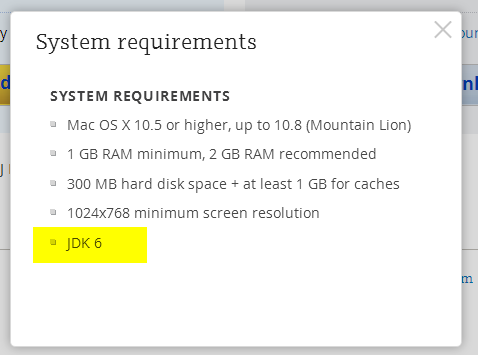
JDK 1.6 is required to run and may be missing on your system. Please install Apple JDK 1.6. There should be a window with the suggestion to install Java when you start the product for the first time, but it could be hidden by other application windows.
Apple JDK 1.6 download: http://support.apple.com/kb/DL1572?viewlocale=en_US&locale=en_US (if this link doesn't open in Safari, please try Firefox or Chrome). Make sure to uninstall the old version first (if you have any).
Modifying Info.plist will break the application digital signature and prevent the patch updates. We do not recommend modifying Info.plist file to run under JDK 1.7 or 1.8. The recommended way of overriding JDK version via idea.properties file can be found here.
Current JDK 1.7 and 1.8 versions have several critical issues. We can't default to the new JDK version until these issues are resolved. Please check the list of the known issues below:
- [could be solved with a third-party utility] Always enabled discrete GPU which drains battery for laptop users
- [fixed for black font on light background] Broken subpixel antialiasing
- [fixed] Mac OS X keyboard shortcuts with alt don't work under Oracle Java 7
- [fixed] Crash when navigate to class with java 7
- [fixed] IDE hangs during startup
- [fixed] Frequent crashes
- [fixed] Crash after a few hours of work
- [fixed but should be verified by the user] Crash with EXC_BAD_ACCESS (SIGABRT)
- [fixed] Crash on system sleep
- [obsolete] Crash on JDK 1.8.0_25
- [not reproducible] Native crash after several days of work
- [should be fixed even in Oracle jdk7] Cannot retrieve host name issue
Issues marked as [fixed] above are fixed only in the custom JDK 1.8 builds provided by JetBrains and bundled with some versions of the products (mostly EAP builds at the moment). We plan to bundle it with all the products eventually.
Comments
Modify <key>JVMVersion</key> in /Applications/IntelliJ IDEA 13.app/Contents/Info.plist to be <string>1.8*</string>.
I'm getting this on Yosemite (fresh installation of apple java from mac developer site and fresh installation of pycharm 3.2):
Dyld Error Message:
Symbol not found: _CGContextSetAllowsAcceleration
Referenced from: /Library/Java/JavaVirtualMachines/1.6.0_65-b14-462.jdk/Contents/Libraries/libawt.jnilib
Expected in: /System/Library/Frameworks/ApplicationServices.framework/Versions/A/ApplicationServices
@ Abolotnov It seems that you need the latest Apple Java for OS X: http://support.apple.com/kb/DL1572?viewlocale=en_US&locale=en_US
Apple not support java6 for OSX 10.10 Yosemite
Show error no found java6
Apple link to download Oracle java8 (apple close support apple-java)
Please fix all product
/Applications/PhpStorm.app/Contents/Info.plist
/Applications/PyCharm.app/Contents/Info.plist
etc.. products
From:
<string>1.6*</string>
To:
<string>1.6+</string>
Support:
Java 8 - (stable http://www.oracle.com/technetwork/java/javase/downloads/jdk8-downloads-2133151.html) / (last https://jdk8.java.net/download.html)
Java 9 - https://jdk9.java.net/download/
Offtopic:
- https://gist.github.com/denji/557e2b0c4ec655149aa3
- https://gist.github.com/denji/9731967
I was able to get things working without modifying any OS X 10.10 (GM candidate) system files by simply downloading Java 8 (8u20) from the following location:
http://www.oracle.com/technetwork/java/javase/downloads/jdk8-downloads-2133151.html
BTW, I'm using it successfully with both Rubymine 6.3.3 and Rubymine 7.0 EAP.
use
<string>1.6\*</string>incorrect,there should be
<string>1.6+</string>Thanks Denis, your solution worked after installing Java 8.
Install oracle java 8 and follow instructions from https://intellij-support.jetbrains.com/entries/23455956 (change 1.6 to 1.8). Works perfectly
Apple Java R.I.P.
Hi, my editor font seems very thin since i updated to yosemite and jdk8, is this normal or a bug ?
it's not a bug, it's the feature
The product does not work, this is not a bug it's a feature.
The release of the new OSX does not seem to have played a crucial role in updating JetBrains products.
An FYI, this part didn't work for me. I got a complete application stall-out from this; wouldn't even Force Quit. I had to reboot my machine, hard boot, to kill it. And OSX reported "an error" that caused the system to reboot.
Second on the fonts: I've been using Envy Code R for years, and after the upgrade the non-bold fonts look horrible.
PS: Installed Oracle's 1.8 JDK, and I see the font issues, too. Appears the anti-aliasing isn't being done very well.
I gave up and reverted back to 1.6, which apparently has some secret magic Quartz hooks that make fonts look nice. Now my fonts look fine.
http://bulenkov.com/2013/09/12/font-rendering-apple-jdk-6-vs-oracle-jdk-1-7-0_40/ - fascinating detour into the guts of java font rendering (TL;DR just go back to 1.6 and use it forever)
Hi, I upgraded to Yosemite and installed 1.6 and was able to open IntelliJ, but maven project doesn't get compiled in Intellij, but I am able to compile just fine through terminal.
Thanks, Denis. The 1.8 JDK solved the problem!
Rktoomey, I agree with you, then you can solve the problem only if Apple itself will begin to do backports-patches to the Retina for "Oracle Java", not only give links in 10.10 to jump Oracle Java. I Wonder how it looks on retina in JDK9?
MacBook users, please be aware that running under JDK 1.7 or 1.8 will always enable your discrete GPU which will lead to the faster battery drain. It's a known JDK bug. If the battery life is critical for you, consider running under the recommended JDK 1.6 version. You can also try other workarounds, like the third-party gfxCardStatus utility that can forcibly disable the discrete GPU and switch to the integrated one.
Serge Baranov, https://gfx.io/
Denis, that is what I've linked in my comment.
It is impossible to update the Info.plist in the latest versions of WebStorm and PyCharm due to the code signature which has been applied to the app bundles. OS X refuses to run the app if the contents of the bundle have changed.
Is there any other way to force PyCharm and WebStorm to use Java 8?
Thank you, Serge, for the scoop on that JDK bug. Do you know if 1.9 will fix it?
Gordon Tyler,
I have configured Intellij to use idk 1.8, on Yosemite, it was just fine yesterday and today. But then I closed the app, and later when I try to open a project or start a new one, it crashes. I get the system report dialog. Is there a way to start the IDE in such way that it will generate proper report that you could use?
Thanks Denis!
IntelliJ 13 crashed for me with an older Apple JDK (1.6.0_29-b11-402) on Yosemite, but after installing the latest Apple Java for OS X 2014-001 http://support.apple.com/kb/DL1572?viewlocale=en_US&locale=en_US which gives java 1.6.0_65, it works again.
i am using WebStorm and just moved to PhpStorm and OS X Yosemite.
those app are great but have issues. Webstorm start to give me lots of "not finding 'open' command" for all type of operation include updating the app from 8.0.4 to 8.0.5.
PhpStorm just eat too much memory, around 2GB. compared to WebStorm that use 0.6GB.