Information below is obsolete for the current product version that come bundled with Java 8. It applies only to old product versions depending on system JDK installed on Mac. As of now, we have resolved most of Java 8 issues for this OS and bundle our custom patched Java version that works the best. In case you have any issues with Java 8, you can switch back to Apple Java 1.6 (must be installed per instructions below). See this blog post for the instructions.
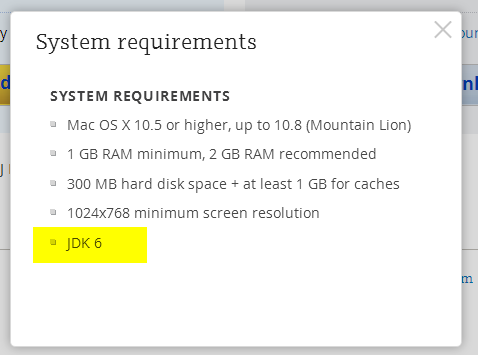
JDK 1.6 is required to run and may be missing on your system. Please install Apple JDK 1.6. There should be a window with the suggestion to install Java when you start the product for the first time, but it could be hidden by other application windows.
Apple JDK 1.6 download: http://support.apple.com/kb/DL1572?viewlocale=en_US&locale=en_US (if this link doesn't open in Safari, please try Firefox or Chrome). Make sure to uninstall the old version first (if you have any).
Modifying Info.plist will break the application digital signature and prevent the patch updates. We do not recommend modifying Info.plist file to run under JDK 1.7 or 1.8. The recommended way of overriding JDK version via idea.properties file can be found here.
Current JDK 1.7 and 1.8 versions have several critical issues. We can't default to the new JDK version until these issues are resolved. Please check the list of the known issues below:
- [could be solved with a third-party utility] Always enabled discrete GPU which drains battery for laptop users
- [fixed for black font on light background] Broken subpixel antialiasing
- [fixed] Mac OS X keyboard shortcuts with alt don't work under Oracle Java 7
- [fixed] Crash when navigate to class with java 7
- [fixed] IDE hangs during startup
- [fixed] Frequent crashes
- [fixed] Crash after a few hours of work
- [fixed but should be verified by the user] Crash with EXC_BAD_ACCESS (SIGABRT)
- [fixed] Crash on system sleep
- [obsolete] Crash on JDK 1.8.0_25
- [not reproducible] Native crash after several days of work
- [should be fixed even in Oracle jdk7] Cannot retrieve host name issue
Issues marked as [fixed] above are fixed only in the custom JDK 1.8 builds provided by JetBrains and bundled with some versions of the products (mostly EAP builds at the moment). We plan to bundle it with all the products eventually.
Comments
And what's the download link for RubyMine?
Chris Anderson:
I know I'm old and my eyesight is bad but you didn't have to be so mean about it :)
Thanks!
Hello - I downloaded the OSX 7.1 with JDE1.8 bundle described above and get RubyMine is damaged and can't be opened. Running OSX 10.9.5. Are there any other steps I can take? I already followed the steps here http://stackoverflow.com/questions/8297970/how-to-uninstall-rubymine to uninstall my earlier version of RM which stopped recognizing the backspace key in the editor after the OSX update to 10.9.5
Matt Kolenda, what's the checksum of the file and the link that you have used to download it? It would be better if you open a ticket with support.
So I'm running 10.11, and this complaint still exists. Is there an update one day that will fix this? I understand that 1.6 is ideal for performance reasons, and that's fine - but why does IntelliJ try to force me to upgrade the version of Java then? Just get rid of the alert?
Dan, there is Java 8 bundled build: http://download.jetbrains.com/idea/ideaIU-14.1.5-custom-jdk-bundled.dmg .
I just upgaded my Mac to El Capitan, and I am unable to use the Java 8 bundled version of RubyMine. Here is the error I see in the console when I attempt to start the app. Hope you guys will have a fix for this soon, because the Java 8 version is noticeably faster.
10/4/15 11:55:35.237 PM rubymine[805]: Cannot load JVM bundle: Error Domain=NSCocoaErrorDomain Code=3585 "dlopen_preflight(/Applications/RubyMine.app/Contents/jre/jdk/Contents/MacOS/libjli.dylib): no suitable image found. Did find:
/Applications/RubyMine.app/Contents/jre/jdk/Contents/MacOS/libjli.dylib: mach-o, but wrong architecture" UserInfo={NSLocalizedRecoverySuggestion=Try installing a universal version of the bundle., NSFilePath=/Applications/RubyMine.app/Contents/jre/jdk/Contents/MacOS/libjli.dylib, NSLocalizedFailureReason=The bundle doesn’t contain a version for the current architecture., NSLocalizedDescription=The bundle “OpenJDK 8” couldn’t be loaded because it doesn’t contain a version for the current architecture., NSDebugDescription=dlopen_preflight(/Applications/RubyMine.app/Contents/jre/jdk/Contents/MacOS/libjli.dylib): no suitable image found. Did find:
/Applications/RubyMine.app/Contents/jre/jdk/Contents/MacOS/libjli.dylib: mach-o, but wrong architecture, NSBundlePath=/Applications/RubyMine.app/Contents/jre/jdk}
I don't want Java 8... it breaks a lot of what I develop.
FWIW, I changed the Info.plist to remove the 1.6*,1.7+ to just 1.7+, and that solved my problem - but as I understand it there are performance implications to this, is that right?
Just attempted to upgrade to RM 8 on El Capitan and RM won't open.
mine .results in:LSOpenURLsWithRole() failed with error -10810 for the file /Applications/RubyMine.app.Updating the JVM version in Info.plist makes no difference. I have java 1.6 installed, which was what corrected this issue after updating to El Capitan originally.
Interestingly, I can open RM by double clicking RM from the installer, just not from the Applications directory.
Just tried reverting back to RM 7. Installing RM 7 or 8 with the bundled jdk, the application fails to start, but going back to RM 7.1.4 without the bundled jdk works.
It seems that as of the latest version upgrade announcement, the bundled jdk versions are the default. This isn't too surprising since the issues listed on this page seem to be fixed.
Have you reported those Java issues upstream/submitted the patches ?
Guillaume DIDIER - No, other than this support forum, I'm not sure where else to report it.
I mentioned it in this ticket, since it seemed related, but it sounds like the issues here were fixed for versions prior to El Capitan and I should create a new ticket.
Danny Anderson, I was asking if Jetbrains had reported the bugs in the article upstream. Sorry for the confusion.
No problem. This is the first time I've had an issue that I needed to report, so I'm not totally clear on the process. Thanks for clarifying.
It is nice post.
I am seeing an issue with IntelliJ IDEA 14 and 15 on OS X 10.11.2 (El Capitan). I had only the JDK 7 installed.
Steps that did not work:
* I tried modifying the Info.plist (yes I know that invalidates the CodeSignature) to remove the "1.6+,"
* I tried reinstalling the latest IntelliJ IDEA versions of 14 and 15. Launching 15 worked once, but once I updated some plugins and restarted, I was stuck in the "Java not found" error loop again.
I eventually removed ALL versions of JDK from my system, reinstalled the latest JDK 7, 8. Then, only after installing the linked version of 6 https://support.apple.com/kb/DL1572, did IntelliJ IDEA work.
My active Java version is not 6:
$ java -version
java version "1.8.0_66"
Java(TM) SE Runtime Environment (build 1.8.0_66-b17)
Java HotSpot(TM) 64-Bit Server VM (build 25.66-b17, mixed mode)
Jason, these IDE versions do not depend on system Java, they run on the bundled Java 8 unless you have overridden it:
http://download.jetbrains.com/idea/ideaIU-14.1.5-custom-jdk-bundled.dmg
https://download.jetbrains.com/idea/ideaIU-15.0.2-custom-jdk-bundled.dmg