Information below is obsolete for the current product version that come bundled with Java 8. It applies only to old product versions depending on system JDK installed on Mac. As of now, we have resolved most of Java 8 issues for this OS and bundle our custom patched Java version that works the best. In case you have any issues with Java 8, you can switch back to Apple Java 1.6 (must be installed per instructions below). See this blog post for the instructions.
JDK 1.6 is required to run and may be missing on your system. Please install Apple JDK 1.6. There should be a window with the suggestion to install Java when you start the product for the first time, but it could be hidden by other application windows.
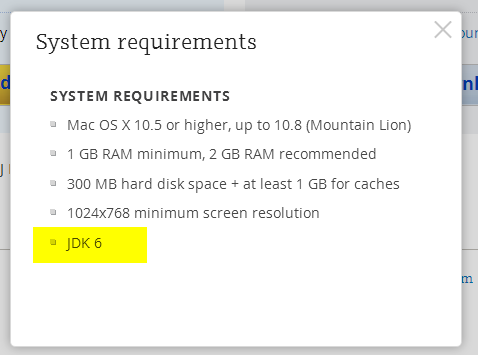
Apple JDK 1.6 download: http://support.apple.com/kb/DL1572?viewlocale=en_US&locale=en_US (if this link doesn't open in Safari, please try Firefox or Chrome). Make sure to uninstall the old version first (if you have any).
Modifying Info.plist will break the application digital signature and prevent the patch updates. We do not recommend modifying Info.plist file to run under JDK 1.7 or 1.8. The recommended way of overriding JDK version via idea.properties file can be found here.
Current JDK 1.7 and 1.8 versions have several critical issues. We can't default to the new JDK version until these issues are resolved. Please check the list of the known issues below:
- [could be solved with a third-party utility] Always enabled discrete GPU which drains battery for laptop users
- [fixed for black font on light background] Broken subpixel antialiasing
- [fixed] Mac OS X keyboard shortcuts with alt don't work under Oracle Java 7
- [fixed] Crash when navigate to class with java 7
- [fixed] IDE hangs during startup
- [fixed] Frequent crashes
- [fixed] Crash after a few hours of work
- [fixed but should be verified by the user] Crash with EXC_BAD_ACCESS (SIGABRT)
- [fixed] Crash on system sleep
- [obsolete] Crash on JDK 1.8.0_25
- [not reproducible] Native crash after several days of work
- [should be fixed even in Oracle jdk7] Cannot retrieve host name issue
Issues marked as [fixed] above are fixed only in the custom JDK 1.8 builds provided by JetBrains and bundled with some versions of the products (mostly EAP builds at the moment). We plan to bundle it with all the products eventually.
Comments
Does this apply to WebStorm too? Because I've never had to install JDK for it to work before.
Btw, I'm using WebStorm 6.
Seriema, yes WebStorm 6 is also affected. Older Mac versions had JDK 1.6 already installed, then they started to show a suggestion to install it when you first run any Java application. If there are security restrictions to install the software, such notification may not be shown. It also appears that Mavericks doesn't show this notification on top of the other windows, so it can be missed by the user.
I was having the same issue and re-installing apple java fixed.
Serge,
For me intellij crashes after re-installing apple-java and moving 1.7.
Thanks,
Shreyas
Shreyas Desai, try a more recent JDK 1.7 version (1.7.0_45) or switch back to 1.6.51.
I have a differen't problem with RubyMine and IntelliJ Idea:
LSOpenURLsWithRole() failed with error -10658 for the file /Applications/RubyMine.app.
I have read that this can be caused by permissions (chmod +x) - however RubyMine had executable flags just after installation.
LSOpenURLsWithRole is the same problem.
Me too = neither PyCharm 2.7 or 3.0 will start. Was Mavericks a surprise to JetBrains?
Wgilpin, we are working on a new launcher that will not require JDK 1.6 to run, but it will take some time. At the moment there is no other solution except installing JDK 1.6 as described in this KB document. We could not predict that OS update would cause this problem for some users, it didn't happen on our test machines.
Does anyone here have new Wacom drivers installed for Mavericks?
I have re-installed the Wacom drivers without errors, and I can run IDEA12C under Java 6 without problems.
This launcher for bundled java applications does not require jdk 1.6: https://github.com/wonder-mice/mac-java-launcher
Can be used to run IntelliJ without jdk 1.6 installed.
Update to JDK 7 will solved this problem and probably enhance IDEA experience..
JDK 1.6 as described worked for me ... after migrating to an SSD, but essentially same issue, new Mavericks OS.
Hy, my Problem is that PHPStorm and WebStorm need 5 Minutes to start. The Icon jumps 2 Minutes at Dock and then the Splashscreen opens. The progress bar needs another 3 Minutes to 100%. After that procedure it works super, but how could this be? Its a new MB Pro i7 Photoshop starts in 3 seconds. I tried to install JDK 1.6 but no effect. THX for any help
Chrisipaul84, your problem is completely different from the one described in this document, please submit a support ticket with idea.log and thread dumps taken with jstack while IDE is starting.
Hey Serge, i thought maybe its the same problem, but i am the only user who waits long enough and dont kill the process after a minute :)
Thank you, i'll do this.
ps: what a 'response time'. Very customer friendly!! THX!!
Hi,
Since I'm not a big fan of using outdated and insecure JDK's/JRE's, I've managed a workaround for this issue using Oracle JDK 1.7.0_45 on OS X.
1 - Go to your JDK installation folder:
cd /Library/Java/JavaVirtualMachines/jdk1.7.0_45.jdk/Contents/Home/
2 - create the directories /bundle and /bundle/Libraries
sudo mkdir -p bundle/Libraries
3 - go to this newly created directory:
cd bundle/Libraries
4 - Create a symbolic link to the libjvm.dylib file on /Library/Java/JavaVirtualMachines/jdk1.7.0_45.jdk/Contents/Home/jre/lib/server/ :
sudo ln -s /Library/Java/JavaVirtualMachines/jdk1.7.0_45.jdk/Contents/Home/jre/lib/server/libjvm.dylib libserver.dylib
5 - Run IDE using a updated JVM :)
Cheers
Well ... so how should we handle the error message that pops up when trying to launch a JBoss 7.2 or Wildfly application server?
"IDEA should be running under JDK 1.7 (at least)"
Lj, configure IDEA to run under JDK 1.7.
I was able to configure my Idea 12 to run under JDK 1.7 but unfortunately it's affected by a bug that hides the application menu when a file open dialog is shown. Unfortunately it never comes back after you close the dialog. Is there any fix for that? I am unable to upgrade to v13 at the moment.
Marcin Palka, do you absolutely must run under JDK 1.7? We still recommend 1.6 on Mac as it has better font rendering, less issues and doesn't activate discrete graphics for laptop users.
I guess I can live with Apple's 1.6. At least I do not have any issues with it.
I cannot be 100% sure but until today I was on 12.1.6 with JDK7(u51) and I do not recall any problems with the menu. I upgraded to 12.1.7 only today and then noticed the issue.
I had this problem, turned out the "install JDK" dialog was indeed hidden behind other windows. Once I found the dialog and clicked OK, PyCharm now starts.
FYI- This happened when I installed the beta of OSX Yosemite. Changing the jvm version to 1.7 solved it for me.
Happened to me as well, with the latest IntelliJ IDEA 13.1.x:
LSOpenURLsWithRole() failed for the application /Applications/IntelliJ IDEA 13.app with error -10810.
Fixed by replacing "1.6*" with "1.8" in /Applications/IntelliJ\ IDEA\ 13.app/Contents/Info.plist
PyCharm crashes on start with Yosemite Beta 3 - up until now it was working just fine. Any ideas or suggestions? I downloaded and installed the java8 b21 but it does not seem to make it available to the rest of the system, I still can only see 1.6
Yes, I can confirm that Rubymine 6.3.3 crashes on launch with OS X 10.10 and JDK 1.8 (Build: 1.8.0_20-ea).
Rubymine 6.3.3 appears to be working with OS X 10.10 (Beta 4) and JDK (Build: 1.8.0_20ea-b23).
OSX Yosemite: Webstorm requires Java 6... Java 8u11 installed though! :) How can I can past this message without installing Java6? :)