Information below is obsolete for the current product version that come bundled with Java 8. It applies only to old product versions depending on system JDK installed on Mac. As of now, we have resolved most of Java 8 issues for this OS and bundle our custom patched Java version that works the best. In case you have any issues with Java 8, you can switch back to Apple Java 1.6 (must be installed per instructions below). See this blog post for the instructions.
JDK 1.6 is required to run and may be missing on your system. Please install Apple JDK 1.6. There should be a window with the suggestion to install Java when you start the product for the first time, but it could be hidden by other application windows.
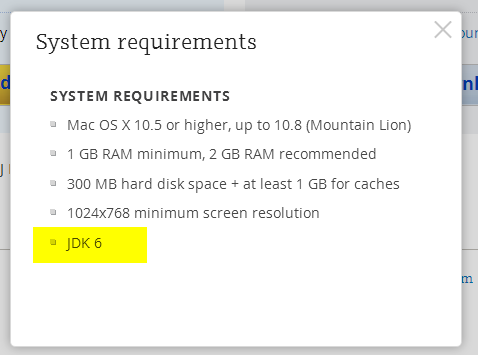
Apple JDK 1.6 download: http://support.apple.com/kb/DL1572?viewlocale=en_US&locale=en_US (if this link doesn't open in Safari, please try Firefox or Chrome). Make sure to uninstall the old version first (if you have any).
Modifying Info.plist will break the application digital signature and prevent the patch updates. We do not recommend modifying Info.plist file to run under JDK 1.7 or 1.8. The recommended way of overriding JDK version via idea.properties file can be found here.
Current JDK 1.7 and 1.8 versions have several critical issues. We can't default to the new JDK version until these issues are resolved. Please check the list of the known issues below:
- [could be solved with a third-party utility] Always enabled discrete GPU which drains battery for laptop users
- [fixed for black font on light background] Broken subpixel antialiasing
- [fixed] Mac OS X keyboard shortcuts with alt don't work under Oracle Java 7
- [fixed] Crash when navigate to class with java 7
- [fixed] IDE hangs during startup
- [fixed] Frequent crashes
- [fixed] Crash after a few hours of work
- [fixed but should be verified by the user] Crash with EXC_BAD_ACCESS (SIGABRT)
- [fixed] Crash on system sleep
- [obsolete] Crash on JDK 1.8.0_25
- [not reproducible] Native crash after several days of work
- [should be fixed even in Oracle jdk7] Cannot retrieve host name issue
Issues marked as [fixed] above are fixed only in the custom JDK 1.8 builds provided by JetBrains and bundled with some versions of the products (mostly EAP builds at the moment). We plan to bundle it with all the products eventually.
Comments
This worked for me: edit the WebStorm Info.plist document, which is located in /Application/WebStorm.app/Content. Replace the value of the key JVMVersion from 1.6* to 1.8*. Save the file and try to start WebStorm again.
nope. it totally damaged the app. i need to download it again and override the installed app. all configuration preserved.
still have this issue
Nisim, try Denis's suggestion to code-sign the apps after you've changed their Info.plist.
Working now. thank you.
i was needed to install the oracle Java version although i had it installed by an update before.
the '1.6+' change solve it.
Thanks, was the same problem: have updated to Yosemite and needed to change info.plist
Denis, when I tried that codesign command, it says "no identity found".
@Gordon Tyler: you need to create a code signing identity first. Keychain Access > Certificate Assistent > Create a Certificate. Select 'code signing' as type.
Thanks, Bart.
For others trying to do this: Create the code signing identity in the System keychain. When you run the codesign command, you must put the name of the identity (e.g. "Gordon Tyler") after the -s option.
So, Yosemite doesn't come with Java. I installed Java 8 and, editing the Info.plist file in the Webstorm app folder to JDK "1.6+" worked. However, the fonts look pretty bad. So, I went to this link http://support.apple.com/kb/DL1572 and downloaded Apple's Java package. I installed it and then, under /Library/Java/JavaVirtualMachines/ ran "sudo rm -Rf" to delete Java 8. That's it. Now Webstorm is working with nicely rendered fonts with the Java 6 I installed from Apple's website.
I can't delete 8 the way G did, because I need to use it.
This is a development tool, the answer to a problem should not be to degrade the version of an OS back several years and two major versions.
tried Vermicida's fix and it seems to have worked.
Serge, any updates on this? It's been an issue for over a year and using an outdated, insecure, unpatched JVM is not a long term solution. Please address this issue and create a launcher for all of your products that will use any installed JVM.
Gshankman, we decided to use JDK 1.6 by default for now, until the issues mentioned in this document are resolved. Apple still updates this JDK, 1.6.0_65 version was released not too long ago. As this JDK provides the best experience with our products, it will be used by default. As soon as JDK 1.8 critical issues are resolved, we'll switch to the new version.
Oracle has unveiled a plan to end support for Java 7.
Developers and users are advised to begin the transition to Java SE 8
https://blogs.oracle.com/java/entry/java_se_8_on_java
Noteworthy comment from Henrik Stahl when he was notified about the list above:
Ted - Your link is an old list of bugs that affect IntelliJ. This is a very mixed list. Some of these have been fixed, some are in progress (such as the subpixel aliasing one), others are due to quirks in the Apple JDK that was not part of the Java specification (keyboard shortcuts) that IntelliJ must work around, etc. Putting the blame on Oracle for all of these is incorrect and hardly fair, especially given that the JDK for OS X is a free/gratis product. We work off our bug backlog in priority order, and since this is OpenJDK the discussion on the issues and the fixes as well as the priority calls are openly available. And of course, if you urgently need something fixed, join OpenJDK and contribute, or persuade IntelliJ to do so. Cheers!
We don't blame Oracle in any way. Indeed, some bugs are already fixed in Java 9. For other bugs our developers are working together with Oracle to speed up a fix or provide a workaround. We are contributing patches to OpenJDK, etc. It doesn't change the fact that at the moment Java 6 provides the best experience with our products on OS X. As soon as we feel that Java 8 can be used without major problems, we'll switch to it.
As of now, java 6 does *not* provide the best experience.
I was finally forced to update, and had to hack WebStorm to run on java 8.
So far I have not had a single problem except that WebStorm was so out of date.
In a way, I agree with Bpappin. On 1.8, PhpStorm feels much better. *However, the font issue was a deal breaker. I tried to deal with it, but the text was just illegible in some areas... As a result, I was forced to drop back to 1.6. If subpixel font rendering is fixed in 1.9 - sign me up! That is honestly the only issue I ran into (so far) that's holding me (personally) back...
gp, I'm not seeing any font issues. Can you tell me where you are seeing them? I'm interested in seeing if I can reproduce your issue.
Side-by-side comparison. 1.6* vs 1.8* using OSX 1.6 vs Oracle 1.8.
I should note: the upload, and image compression, is actually making 1.8 look better. It's very pixelated on my screen natively. ;)
GP: do you get that if you switch back to the default scheme (Preferences -> Colors & Fonts)?
I'm sort of seeing a little blurriness around the edges, but I had to look so closely that I didn't notice until then.
(btw, I'm in Canada, why is "colour" spelled "color"?)
Yes, but it's not as noticeable. However, that hurts the eyes now. ;)
The blurring in the first picture is harsher than it actually is on screen.
I just had a revelation: it appears to be a monitor calibration issue? On my MBPro Screen, the fonts actually look fine. On my external, an LG 22", fonts look un-aliased.
GP, I'm not seeing the same issue, although I do see that the anti-aliasing is much heavier in WebStorm than in Eclipse.
For some reason its more obvious for you than me, so I can live with it :)
iI you "save as" you can edit the theme to try another font, but I suspect that not going to work, since it's the anti-alias thats causing the problem and they have not allowed you to change that property.
Anyway, i've attached an example so you can see what I see. The image is pretty much exactly what I'm seeing on my screen.
Not sure if it makes any difference, but I'm running a late 2011 MacbookPro with Yosemite and a Thunderbolt display.
Ahh, that is interesting! Could it be a resolution issue?
I mean, it still shouldn't happen, but maybe thats why it looks ok to me.
Not sure. But I'm not the only one: https://discussions.apple.com/thread/6623258
My only guess is Apple may have fixed something within the JVM to resolve font rendering issues on external monitors with third party applications? I do know I don't see this font issue with other OSX apps. Just PhpStorm (which also happens to be the only java app I use).
I don't like that Apple pulls herself with a blanket and gives users a leaky Java 6 with most of the vulnerabilities that it is not possible to fix without changing major release. In JDK9 and the latest build of Java 8 added flags for deduplication resource consumption and the new garbage collector that reduces impact and resource consumption of the IDE. In Java6 Apple still felt the problem with the race threads and memory lock and regression problems IPC in a multi-core CPU.
GPU: http://hg.netbeans.org/jet-main/rev/3fc92063f8bc
Font http://hg.netbeans.org/jet-main/rev/1308aa7e0d17 and http://hg.netbeans.org/jet-main/rev/e1537b6b28f7
Opening one project, all good!
Opening a second project.... phpstorm crash!
Oh my.....