Information below is obsolete for the current product version that come bundled with Java 8. It applies only to old product versions depending on system JDK installed on Mac. As of now, we have resolved most of Java 8 issues for this OS and bundle our custom patched Java version that works the best. In case you have any issues with Java 8, you can switch back to Apple Java 1.6 (must be installed per instructions below). See this blog post for the instructions.
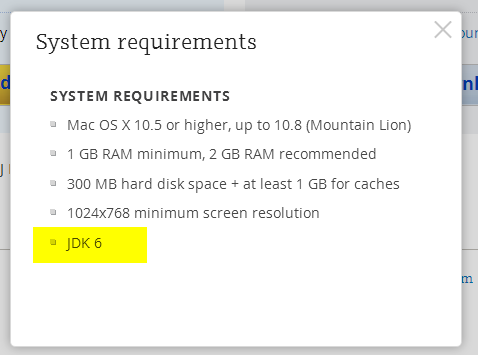
JDK 1.6 is required to run and may be missing on your system. Please install Apple JDK 1.6. There should be a window with the suggestion to install Java when you start the product for the first time, but it could be hidden by other application windows.
Apple JDK 1.6 download: http://support.apple.com/kb/DL1572?viewlocale=en_US&locale=en_US (if this link doesn't open in Safari, please try Firefox or Chrome). Make sure to uninstall the old version first (if you have any).
Modifying Info.plist will break the application digital signature and prevent the patch updates. We do not recommend modifying Info.plist file to run under JDK 1.7 or 1.8. The recommended way of overriding JDK version via idea.properties file can be found here.
Current JDK 1.7 and 1.8 versions have several critical issues. We can't default to the new JDK version until these issues are resolved. Please check the list of the known issues below:
- [could be solved with a third-party utility] Always enabled discrete GPU which drains battery for laptop users
- [fixed for black font on light background] Broken subpixel antialiasing
- [fixed] Mac OS X keyboard shortcuts with alt don't work under Oracle Java 7
- [fixed] Crash when navigate to class with java 7
- [fixed] IDE hangs during startup
- [fixed] Frequent crashes
- [fixed] Crash after a few hours of work
- [fixed but should be verified by the user] Crash with EXC_BAD_ACCESS (SIGABRT)
- [fixed] Crash on system sleep
- [obsolete] Crash on JDK 1.8.0_25
- [not reproducible] Native crash after several days of work
- [should be fixed even in Oracle jdk7] Cannot retrieve host name issue
Issues marked as [fixed] above are fixed only in the custom JDK 1.8 builds provided by JetBrains and bundled with some versions of the products (mostly EAP builds at the moment). We plan to bundle it with all the products eventually.
Comments
After upgrading to Yosemite, the OS re-installed Java (1.6.0_65) and things work mostly fine. Mostly, since I did get a Java crash (in ant, outside of JetBrains), so I filed a bug with Apple, and they responded that Java is no longer supported. They still install it for you-- and a newer version, even-- but it appears to crash more often and they don't support it.
Long story short, JetBrains needs to update their Java version and OS X installation strategy fast, because that's about as big a hint as Apple gives that OS X 10.11 will make it really hard to run Java 6. And with Oracle discontinuing Java 7 at about the same time, we need a version that targets Java 8.
I noticed that JDK9 has less regressive than JDK8 for Yosemite. The problem is in the font, java.prefpane still looks intimidating at Oracle...
http://download.java.net/openjdk/testresults/6/testresults.html
http://download.java.net/openjdk/testresults/7/testresults.html
http://download.java.net/openjdk/testresults/8/testresults.html
http://download.java.net/openjdk/testresults/9/testresults.html
JDK9 Does not work copy/paste in JetBrains - PhpStorm
https://bugs.openjdk.java.net/browse/JDK-8058702
this page http://support.apple.com/kb/DL1572 throws me:
We're sorry.
We can't find the page you're looking for.
Please return to the Apple Support homepage.
Can someone please give me direct download link to 1.6 ?
PLEASE !
Bpappin, how did you hack in JDK 8?
...disregard, reinstalling JDK 1.6 worked. Just going to go with that until JetBrains updates the default version.
I modified the Info.plist, by changing the 1.6* to 1.8* and it worked fine.
The note at the top of this post says it will prevent updates, however I have had at least one successful update since I made the adjustment.
I'm surprised after all this time this is STILL an issue. I'm going to have to switch out from using PyCharm unless this is fixed very soon. This could not have been a surprise as I'm sure JetBrains has access to beta version of Apple software. I'm not going to hack, modify or install an outdated, obsolete JDK in order to run the software.
After cleaning project caches this problem seems to have gone away. I'm not quite sure if it totally fixed it, but for now I'm out of the storm :-)
I changed the Info.plist to specify JDK 1.8* instead of 1.6* and it seems to work just fine. I agree with other posters, it's absurd to insist on a totally obsolete version of the JDK.
@Bpappin: Wait, seriously!? This flies in the face of what JetBrains has always said...
Can someone from JetBrains please comment? What are the risks with this?
These issues are also major obstacles to upgrading to JDK7 or 8 for me
https://youtrack.jetbrains.com/issue/IDEA-116140 - Structure popup appears behind the main windows on Mac secondary display
https://youtrack.jetbrains.com/issue/IDEA-111782 - Dragging text in the editor sometimes duplicates it instead of moving it under Mac OS X / Oracle Java 7
Wow, you can't even log into the OpenJDK Jira to vote on or watch these critical issues.
"Everyone with OpenJDK Author status or above has a JBS account which may be used to create and edit bugs. Those without accounts can view bugs anonymously."
https://bugs.openjdk.java.net/browse/JDK-8023794 - appears to be under review for Java 9. Jetbrains trying to get Oracle to patch into JDK 8.
https://bugs.openjdk.java.net/browse/JDK-8047288 - fixed in JDK 8u40 due in Jan 2015, there is a patched JDK 8u25 available (https://youtrack.jetbrains.com/issue/IDEA-117416)
https://youtrack.jetbrains.com/issue/IDEA-111466 - appears to have an attempted fix, but not sure that it is working for everyone?
https://bugs.openjdk.java.net/browse/JDK-8057830 - under review for JDK 8u40 due in Jan 2015
https://bugs.openjdk.java.net/browse/JDK-8054211 - planned for Java 9, does not appear to be actively worked
https://youtrack.jetbrains.com/issue/IDEA-129634 - Blamed on JVM but no linked OpenJDK issue.
https://youtrack.jetbrains.com/issue/IDEA-128481 - Blamed on JVM but no linked OpenJDK issue.
https://youtrack.jetbrains.com/issue/IDEA-131767 - Fixed in Java 9, no link to OpenJDK issue.
https://youtrack.jetbrains.com/issue/IDEA-127234 - marked duplicate of https://youtrack.jetbrains.com/issue/IDEA-127574 which is an OpenJDK issue that is planned for Java 9. Issue left open even after being marked duplicate.
https://youtrack.jetbrains.com/issue/IDEA-131622 - no associated OpenJDK issue, only the advice to use JDK 6. Issue left open.
Just downloaded the ultimate 30-trial. I'm running Mac OS X 10.10. Have Java 8 installed. The links to acquire Java 6 referenced in this Known Issue result in blank pages. I'm sure this is a great productivity tool but not so much right now. I look forward to exploring it when it is up and running.
This link is working for me (yesterday and verified just now): http://support.apple.com/kb/DL1572
You may be able to download directly via: http://support.apple.com/downloads/DL1572/en_US/JavaForOSX2014-001.dmg
With Java 1.6, I'm a lot of issues when closing projects, when using multiple projects in full screen -- only affects when ALL projects are full screen. PhpStorm will wig-out going into a bit of a half-state of full screen and not... it takes up the full desktop, acting like full screen, but isn't full screen, and totally impossible to edit or work in. Only option is to quit with cmd-Q
Funny thing, http://support.apple.com/kb/DL1572 does not open in Safari but works fine in Firefox.
Same problem, for me it was not solved changing the java version in Info.plist.
open -a /Applications/IntelliJ\ IDEA\ 14.app
LSOpenURLsWithRole() failed for the application /Applications/IntelliJ IDEA 14.app with error -10810.
I solved the problem by removing IDEA14 from Application, then remove all the old files http://stackoverflow.com/a/2774369/2002926
rm -rf ~/Library/Preferences/IntelliJIdea14
rm -rf ~/Library/Caches/IntelliJIdea14
rm -rf ~/Library/Application\ Support/IntelliJIdea14
rm -rf ~/Library/Saved\ Application\ State/com.jetbrains.intellij.savedState
And installed IDEA14 again.
Worked for me!
Not being able to use PyCharm because I don't have an unsupported version of Java installed is lame. What happened to the PyCharm that included the JRE? It was in the later EAP packages.
I have the opposite problem. I want to run IDEA on Mac OS X Yosemite (10.10.1), but I need JDK 8 installed for other purposes. So that means I need to install Apple JDK 1.6 (done). But now how do I tell IDEA to use that version of Java? The JVMVersion key in Info.plist is "1.6+" so it continues to use Java 8. Setting the IDEA_JDK variable to /System/Library/Frameworks/JavaVM.framework/Home causes an error dialog about my Java version being obsolete and asking if I'd like to update it. IDEA does not run.
If I set the JVMVersion to 1.6* in Info.plist, it runs under Java 6. But that's not a recommended approach, right? So what is?
after 1 month of working with Yosemite and get too many issues with Java tools problems like PhpStorm and WebStorm. and even other products i decided to rollback to Mavericks (10.9.5).
after rollback all back to work well with 50% memory usage and full development speed i used to work with. except of Java issues, Yosemite has too many small issues that us, developers, encounter all the time.
@Cap10morgan I don't see a problem with specifying JVMVersion 1.6*. It works because it limits the JVM to 1.6something, which means the installed Apple JVM. If it works for you, use it.
@Pbw One problem, possibly among others, is that–according to JetBrains support–it breaks app updates. They specifically recommend not doing it, so I'm asking, what do they recommend instead?
You could download the bundled JDK using the URL http://download-cf.jetbrains.com/idea/ideaIU-14-jdk-bundled.dmg.
But remember that you do so at your own risk (it's not supported).
My 14 CE EAP version was reporting 222.5 in About. and saying that an upgrade was available to 225. My Info.plist had been set to "1.6*", but I reset it to "1.6+" for this exercise.
I downloaded the update, opened the DMG file, and dragged to Applications. "There is an older version..." Replace. I then killed off the IntelliJ 14 process (should have done it first) and then started the app again. Still reporting 222.5. I trashed the app, then re-installed the update I had just downloaded. I had to start it from finder with a right-click, Open, Ok sequence, but it opened Ok and reported 139.225, running on JRE 1.6.0_65.
From a terminal, 'java -version' reports
java version "1.8.0_25"
The app Info.plist file has "1.6+" so it seems that you can install Java 8, and IntelliJ 14 CE EAP will run on the Apple 1.60 if it finds it.
@Intellij Then what is supported? I want to run a supported Java 1.6 configuration. How can I do that?
Having the same issue on Mac OS 10.10 - don't want to install a legacy Java JDK...Have 1.8.0_25
Life is too short to have to jump thru so many hoops :)
I hope it gets done (update to Jbefore my trial period runs out.
Have subscribed to this post for updates!
http://support.apple.com/kb/DL1572 does not open with firefox, chrome, or safari. My phpStorm is not working - and it's not like I can wait to figure this out so resorting to using other IDE.
@Nada, we've verified that this link still works fine. If you can't access it for some reason, please try this PhpStorm 8.0.2 build with bundled JDK 8, it doesn't have any external dependencies: http://download.jetbrains.com/webide/PhpStorm-EAP-139.659-custom-jdk-bundled.dmg .
nope - the link is not working for me. As everything else is working on the net, I assume it's the site.
Will try the bundled link. Thank you.