Information below is obsolete for the current product version that come bundled with Java 8. It applies only to old product versions depending on system JDK installed on Mac. As of now, we have resolved most of Java 8 issues for this OS and bundle our custom patched Java version that works the best. In case you have any issues with Java 8, you can switch back to Apple Java 1.6 (must be installed per instructions below). See this blog post for the instructions.
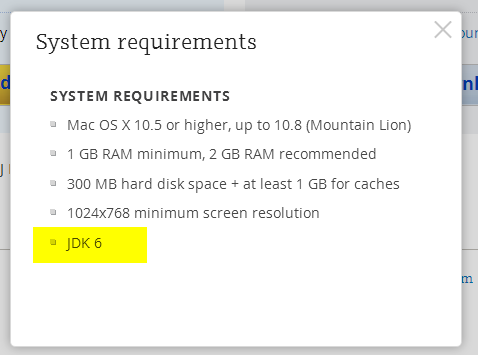
JDK 1.6 is required to run and may be missing on your system. Please install Apple JDK 1.6. There should be a window with the suggestion to install Java when you start the product for the first time, but it could be hidden by other application windows.
Apple JDK 1.6 download: http://support.apple.com/kb/DL1572?viewlocale=en_US&locale=en_US (if this link doesn't open in Safari, please try Firefox or Chrome). Make sure to uninstall the old version first (if you have any).
Modifying Info.plist will break the application digital signature and prevent the patch updates. We do not recommend modifying Info.plist file to run under JDK 1.7 or 1.8. The recommended way of overriding JDK version via idea.properties file can be found here.
Current JDK 1.7 and 1.8 versions have several critical issues. We can't default to the new JDK version until these issues are resolved. Please check the list of the known issues below:
- [could be solved with a third-party utility] Always enabled discrete GPU which drains battery for laptop users
- [fixed for black font on light background] Broken subpixel antialiasing
- [fixed] Mac OS X keyboard shortcuts with alt don't work under Oracle Java 7
- [fixed] Crash when navigate to class with java 7
- [fixed] IDE hangs during startup
- [fixed] Frequent crashes
- [fixed] Crash after a few hours of work
- [fixed but should be verified by the user] Crash with EXC_BAD_ACCESS (SIGABRT)
- [fixed] Crash on system sleep
- [obsolete] Crash on JDK 1.8.0_25
- [not reproducible] Native crash after several days of work
- [should be fixed even in Oracle jdk7] Cannot retrieve host name issue
Issues marked as [fixed] above are fixed only in the custom JDK 1.8 builds provided by JetBrains and bundled with some versions of the products (mostly EAP builds at the moment). We plan to bundle it with all the products eventually.
Comments
<< done. Thank you - the bundled JDK works fine!
Perhaps this is the future as a transparent replacement for the jdk http://vmkit.llvm.org/index.html
http://www.wikiwand.com/en/Comparison_of_Java_virtual_machines
I disagree with that comment. I always modify Info.plist and change 1.6* to 1.8* and am running IntelliJ and PyCharm with success for over an year now. Even CLion (seems to) work fine.
Downgrading to 1.6 is not an option as my company's security team has banned obsolete versions from all machines (no exceptions).
In /Applications/Webstorm.app/Contents/Info.plist -
<key>JVMVersion</key>
<string>1.6+</string>
Tried to run -
codesign -f -s - "/Applications/WebStorm.app"
Got
/Applications/WebStorm.app: replacing existing signature
/Applications/WebStorm.app: unsealed contents present in the bundle root
Webstorm won't start, screenshot attached. w/o Webstorm I'm dead in the water @ work tomorrow.
Patrick, why do you need to run under a different JDK version? What problems do you have with 1.6? Can you just revert back to the default Info.plist and make sure you have the latest 1.6 JDK update installed on the system?
Please submit a support ticket so that our engineers can help you. It would be more convenient and all the users who responded here will not receive the notifications about the updates they may be not interested in.
Modifying Info.plist will break application signature, it's expected. We've implemented another way to specify JDK version recently, check this comment. See also this document if you can't find idea.properties file for your product.
If it still doesn't start, submit a ticket to support, but the recommended solution is to install JDK 1.6.
Just upgraded to Yosemite and bumped into this issue. Can someone please clarify: if I downgrade to Java SE 6 using the suggested link (http://support.apple.com/kb/DL1572), does the built-in Java version 1.8 become useless? Is there any way to install Java SE 6 in my home directory and have WebStorm use it, without affecting any of Yosemite's standard setup?
Thanks in advance for your time.
Hi Naresh,
I've just done an upgrade to Yosemite (directly to 10.10.1), and I was told that my version of Java was obsolete, and I was directed to the location of the 2014-001 Java6 download. This was in fact already installed. I went ahead and installed it, and then I went to the Oracle JDK 8 download site, downloaded and re-installed JDK 8. I have taken this basic approach on previous occasions when OS X Java6 was updated. For all intents and purposes, JDK 8 is installed, but those applications like IntelliJ which want J6 can find it.
Afterwards:
$ /usr/libexec/java_home
/Library/Java/JavaVirtualMachines/jdk1.8.0_25.jdk/Contents/Home
I am running into this problem as well. Things used to work fine and now they don't. I am not sure if I changed the OS to Yosemite or grabbed a newer Java but I get the same message about needing the old java.
+1 For Vermicida's fix Yosemite, Java 8 "This worked for me: edit the WebStorm Info.plist document, which is located in /Application/WebStorm.app/Content. Replace the value of the key JVMVersion from 1.6* to 1.8*. Save the file and try to start WebStorm again."
The EAP version with JDK Bundled will not allow me to Activate my license using my Jet Brains Account. I get this error: "JetProfile connection error: SSLHandshakeException: java.security.cert.CertificationException: java.security.SignatureException: Signature length not correct: got 256 but was expecting 512"
It works fine in Demo mode. I've tried this on my old machine and I had to go through this procedure. Download Java 6, Download PHPStorm 8.02, open once and activate with JetBrains account. After doing this, then I can Activate my EAP version. However on my new machine I'd rather avoid installing Java 6.
Is JetBrains aware of the licensing problem with the EAP version? Anyone else have the problem?
JetBrains folks: Java 6 reached end of life two years ago. Java 7 will reach public EOL in a couple months and you still haven't figured out how to use it?
That can only mean you're not putting resources into IntelliJ. In other words, letting it drift into maintenance mode, collecting money from people willing to go along with that but never really bringing it up to date. It is legacy now.
I'm truly sorry to hear that, but it means I can't install it, can't buy it, and have to recommend to others that they avoid it (hardly necessary, they'll be blocked by the Java 6 requirement, too).
Larry West, our products bundled with custom JDK 1.8 are already available via EAP. Custom JDK 1.8 will be available with the release versions soon, we are doing the final tests and fixing the remaining bugs. You can see from the main article that most of the issues have been already resolved.
@Serge okay, I eagerly look forward to that release!
can't wait for the official release, I am stuck right now with my Mac. I don't want to install Java 6
Satish,
You can install Java 6, then re-install Java 8 JDK, and the default Java on your system will be Java 8. Java 6 will only be used by those applications like IntelliJ that actually go looking for it. The Java 6 will not be Internet-facing, except when it calls IntelliJ to check for updates.
Then you can remove Java 6 JetBrains releases the version with the fixes.
I can confirm that the Apple support link no longer works in Safari, Chrome, and Firefox:
http://support.apple.com/kb/DL1572?locale=en_US
All take you to a broken link :( Very frustrating.
Weird, the link still works for me. Try the direct dmg link instead: http://support.apple.com/downloads/DL1572/en_US/JavaForOSX2014-001.dmg .
The Apple support page doesn't work for me either. I get an Apple-branded 404 page when trying to get the DMG file. Sigh! I just upgraded to Yosemite and I need this working today.
Duckumu, Welsh, I've sent you the alternative link via support tickets.
If anyone else can't download JDK 1.6 from Apple site, please submit a ticket to JetBrains support for the mirror link. I will not make it public as I'm not sure about the licensing restrictions for distributing this dmg.
Thanks Serge, I will do that.
Works! Thank you, great support.
Gahhhh wish I spotted this before I upgraded to Yosemite. I Have a deadline so I will install v6 java to get Pycharm up but I can't say I'm impressed. 6 is ancient. my renewal is up soon and given you guys are promising to resolve this I'll fork out for it. please sort it.
How did we get into a situation where IntelliJ is 2 major JDK versions behind current? I could totally understand if we were stuck on 1.8, but there are very very good reasons not to have 1.6 installed and this is pretty disappointing.
Totally agree with you Jdmarshall, it just doesn't make sense for a critical IDE used by many developers not to be compatible with latest version of JDK. For the same reason, I have not renewed my subscription to the IDE
Please people, have a think about this. Apple dumped Java, some time ago. Oracle took over the production of Apple-compatible releases of the JDK. There are bugs _in_the_JDK_ when running on OS X. When I fire up NetBeans, my GPU immediately switches to the discrete, power-hungry unit. NetBeans is an Oracle product. They have yet to solve the power problem on Apple hardware. It's a stretch to expect IntelliJ, which makes an IDE, not a JDK, to sort this stuff out so that we can continue to use our Macs for development (as I do) when, starting with Steve Jobs, Apple declared war on Java, and by extension, on Java developers.
IntelliJ is working to fix problems, some of which are properly the in the domain of Oracle. Good luck to them, and let's hope that Oracle sees value in more timely support for OS X users of the JDK.
Pbw, of course you mean Jetbrains, not IntelliJ. IntelliJ is not a company, but a product of a company named Jetbrains.
While what you say about the JDK might have some merit, Jetbrains sells products that depend on that JDK. They are responsible for their products, and promise that their products perform as designed and as promised. People who have purchased these products expect them to work.
Jetbrains could create products that don't depend on Java. I'd say 99% of the apps on my machine don't depend on Java. It would take a tremendous effort for Jetbrains to convert these products to be native. Their customers can also purchase competing products that don't depend on java. There are some competing products out there.
Personally, I'm sticking with PyCharm. It works fine for me, after a few tweaks. I do wish it weren't java based, but it is, and I'm too lazy to switch.
Serge, you now officially running out of time: “OS X v10.11 is the last major release of OS X that will support the previously deprecated Java 6 runtime and tools provided by Apple. Applications or features that depend upon Java 6 may not function properly or will not launch when Java 6 is removed. Developers should move to a newer version of Java as provided by Oracle. For more info on Java from Oracle: http://www.oracle.com/technetwork/java/javase/overview/” — from https://developer.apple.com/library/prerelease/mac/releasenotes/General/rn-osx-10.11/index.html
PhpStorm doesn't work on OS X El Capitan and Apple will no longer let you install Java 6.
So far i've been unable to get it to work.
Will editing the idea.properties do the trick ?
In exactly which folder do I need to put that file ?
Will I also need to edit the info.plist ?
I've now edited the idea.properties file to read 1.6+ and placed it in a ~Library/Preferences/PhpStorm but that doesn't work.
Alfred Vink, we provide custom JDK 1.8 bundles for all our products, here is the one for the current PhpStorm version: http://download.jetbrains.com/webide/PhpStorm-8.0.3-custom-jdk-bundled.dmg .
Serge,
Didn't know that, that's great!
It works again as expected, thanks for the lightning fast response ;-)